
A good PrestaShop SEO Manager workflow begins with the pages that drive the search demand: product pages, categories, content on the CMS pages, and links between them. On-page optimization isn’t limited to simply adding a keyword in your title tag. It requires a useful, clean URL, a crawlable page, good meta, proper internal linking, accessible images, and a good-performing frontend.
For a growing catalog, manual checks become difficult to maintain, and Knowband provides a practical way to centralize many of them. A practical SEO manager tool for PrestaShop can help you identify missing metadata, weak page structure, duplicate URLs, broken paths, and other issues from the admin area.
PrestaShop’s own documentation recommends treating categories and product pages as important parts of catalog SEO, with broader terms generally suited to category pages and more specific searches suited to product pages. It also highlights titles, descriptions, simplified URLs, content, and redirects as core SEO fields.
1. Start with search intent before editing a page
Before changing a product title or rewriting a category description, decide what the page is supposed to satisfy.
A category page usually needs to answer a broader shopping need. A product page should make the individual item discoverable for specific searches and give enough information for someone to decide whether it fits their needs. CMS pages can support informational intent, brand information, policies, buying guidance, or other topics that don’t belong in the catalog.
For each important URL, record:
- The primary search topic.
- The page type and its role in the buying journey.
- The most relevant supporting terms.
- The expected visitor action.
- The pages that should link to it.
This prevents a common ecommerce problem: several pages competing for the same query because their purpose and content overlap.
2. Fix the page’s title, H1, and opening copy
The visible product name often becomes the main heading in a PrestaShop theme, so check the rendered page rather than assuming the admin field and HTML output are identical.
Give each important page one clear H1. The title should describe the actual product or category, not a string of repeated keywords. PrestaShop’s current SEO guidance also recommends keeping product names readable while incorporating relevant search language where it makes sense.
The opening copy should quickly establish what the page offers. For a product page, mention the product’s defining characteristics and use case. For a category, explain what belongs in the category and what makes the selection useful.
Don’t rewrite a page merely to hit an arbitrary word count. Add information when shoppers genuinely need it: compatibility, materials, dimensions, usage guidance, delivery considerations, or product-selection advice.
3. Write unique search-result metadata
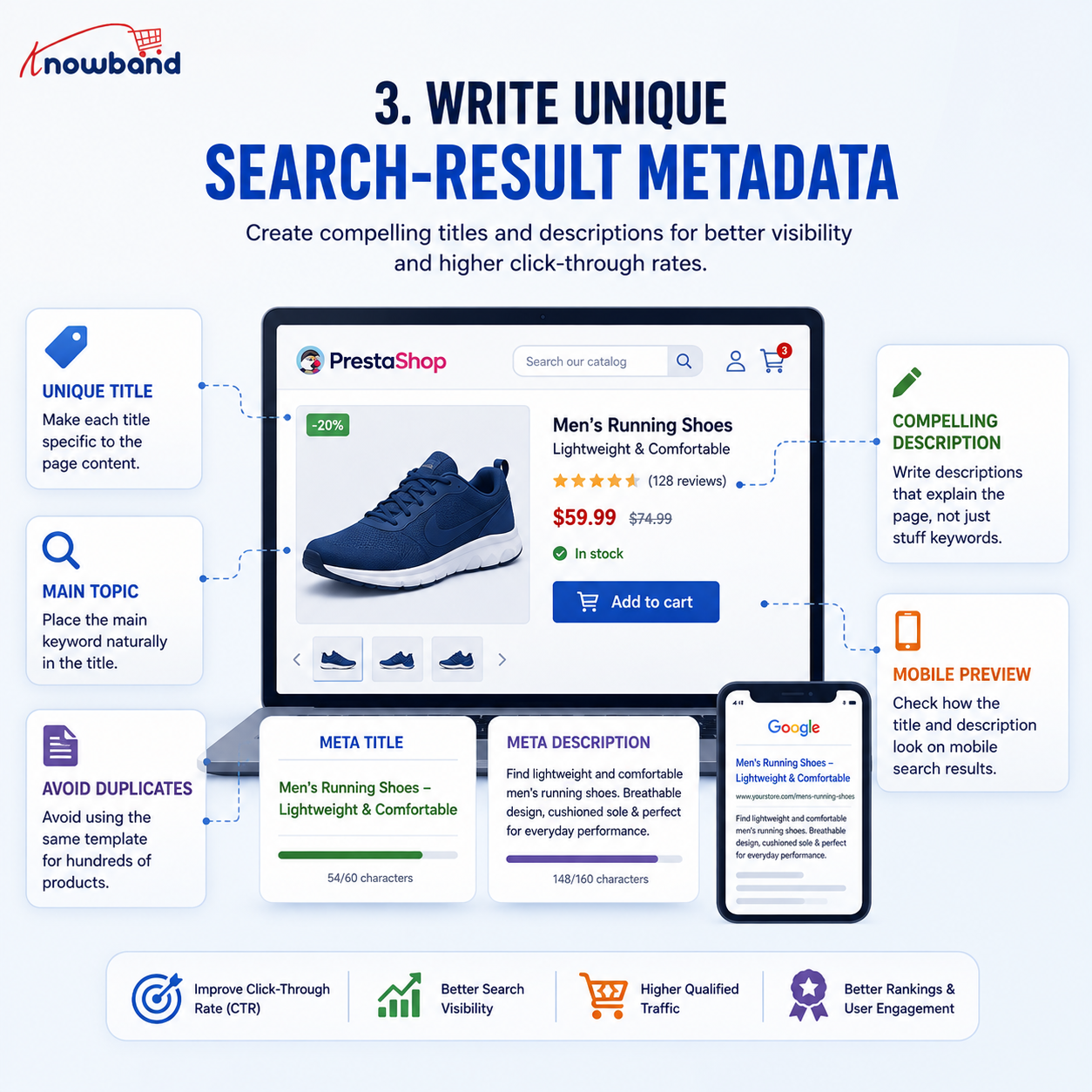
Meta title & Meta description are still important for the catalog representation in search results and can affect user choice for your result, so this should be checked too.
For each priority page:
- Make the title specific to that page.
- Put the main topic in a natural position.
- Avoid repeating the same template across hundreds of products when it creates near-identical titles.
- Write a description that explains the page rather than stuffing it with terms.
- Check the rendered snippet on mobile as well as desktop.
PrestaShop’s documentation describes the title as a key SEO field and recommends unique, factual titles. Its CMS guidance gives practical character ranges for titles and descriptions, while the audit manual supplied for this project uses targets of 30 to 60 characters for SEO titles and 120 to 160 characters for descriptions. These are useful working targets, not guarantees of how Google will display a snippet.
If your store has thousands of products, templates can provide a baseline, but high-value pages deserve manual review.
4. Make URLs readable and stable
A useful URL should tell a person roughly what the page contains. Keep slugs short enough to understand, use meaningful words, and avoid unnecessary parameters when your platform configuration permits cleaner routes.
Do not change established URLs casually. A URL change can break bookmarks, internal links, external references, and search engine access. If a page genuinely moves, map the old address to the most relevant replacement rather than sending every discontinued URL to the homepage.
PrestaShop supports simplified URLs, and its documentation treats readable URL structures as part of SEO configuration.
Your checklist should flag:
- Unnecessarily long URLs.
- Duplicate slugs.
- Redirect chains.
- Old URLs that still receive visits.
- Links pointing to retired pages.
- Canonical URL settings that conflict with the intended indexable page.
5. Improve product and category content
Thin catalog content is difficult to diagnose if you only look at metadata. It is possible for a page to be given a title and description, but still not provide the answer to the shopper’s needs.
For product pages, find out whether it tells what it is, who it is designed for, how it is different from others, and any other relevant specifications. Category pages should tell visitors what’s available rather than being a list of links with little context.
Utilize headings to divide longer text into meaningful parts. Keep paragraphs focused. Write for the person who came to you via the search results page, not for a keyword-density counter.
This article checks all the SEO important factors such as content length, keyword placement, headings, image alt attributes, internal and external links, and readability. These checks can help you identify gaps quickly. However, these are only good on-page practices that a store should follow, and do not guarantee higher Google rankings.
6. Check images and image context
Ecommerce pages often contain many images, so image SEO is partly a content task and partly a performance task.
Use descriptive file names where practical, write useful alt text for meaningful product images, and avoid stuffing keywords into every attribute. Decorative images generally don’t need descriptive alt text.
Also inspect image dimensions and delivery. A large product image can dominate loading performance, especially on mobile connections. Compress images without making product details difficult to inspect, and avoid loading assets that the visitor doesn’t need immediately.
7. Build a useful internal-linking structure
Internal linking helps visitors move between related pages and gives search engines additional context about the relationship between URLs.
A practical PrestaShop structure might connect:
Category → subcategory → product → related product or buying guide
Choose descriptive anchor text when it helps the reader understand the destination. Do not generate hundreds of forced links because a tool is telling you that you should have a certain number of links.
Pay special attention to orphaned pages. A product that is technically indexable but has no useful internal path to it can be difficult for users and crawlers to discover.
8. Control duplicate content and canonical signals
Duplicate content is common in ecommerce. Variants, filters, sorting parameters, pagination, manufacturer pages, and alternative URL paths can create multiple addresses for similar or identical content.
The goal isn’t to make every similar page disappear. Decide which URLs deserve search visibility and make the signals consistent.
Check the canonical URL on important pages, especially after theme changes, URL rewrites, migrations, or module installations. A canonical points search engines toward the preferred version, but it should agree with the site’s broader architecture and not point to an unrelated page.
Also review pages that should not be indexed. A store can lose focus if internal search pages, filter combinations, test URLs, or thin utility pages are unnecessarily exposed to search.
9. Keep the XML sitemap and robots.txt aligned
An XML sitemap helps communicate which URLs you want search engines to discover. It should not become a dumping ground for every URL generated by the store.
Review the sitemap after catalog imports, deletions, migrations, and major URL changes. If your store uses multiple languages, confirm that the appropriate sitemap URLs are available and submitted.
The robots.txt file has a different job. It provides crawler directives and should not be treated as a substitute for indexing controls.
The module manual documents both XML sitemap management and a live robots.txt editor, including the public URLs and configuration options.
10. Find 404s and handle redirects deliberately
A 404 error isn’t automatically an SEO disaster. A removed page with no relevant replacement can legitimately remain unavailable.
Problems arise when valuable URLs break, internal links are leading to them, and visitors are hitting dead ends repeatedly. Check the 404 logs for frequency, referrers, and business value of the missing page.
Use permanent redirects where the content has actually been moved, and there is a close replacement. Avoid redirecting unrelated old URLs simply to eliminate every error.
For stores with frequent catalog changes, this check should be routine rather than a one-time cleanup.
11. Test page speed and Core Web Vitals
On-page page speed insight is a very important metric in the list due to the impact it can have on visibility in search engines and user experience if important pages are performing poorly.
According to Google’s latest documentation, Core Web Vitals are leveraged by Google in its ranking algorithms, but they also mention that good Core Web Vitals scores don’t mean a high ranking. The good thresholds recommended are: LCP < 2.5 seconds, INP < 200 milliseconds, CLS < 0.1 (75th percentile).
For a PrestaShop store, don’t test only the homepage. Sample a product page, a category page, and a representative CMS page. If a recent theme, module, image, or tracking change causes performance to deteriorate, compare the affected page against an earlier baseline.
PrestaShop also documents caching and CSS/JavaScript compression as performance settings available in the back office.
12. Validate structured data and social metadata
Structured data can help search engines understand the information on a page if it is eligible, but you need to be sure the markup adequately represents the visible information on the page and meets search feature requirements.
On product pages, verify that a product description, price, availability, and any markup for reviews are accurate as compared to the visitor’s view. Do not include rating information just for the sake of it to make a result more interesting.
Social metadata is for another purpose. How shared URLs will appear on social media is set in Open Graph & Twitter/X card settings. Maintain representative titles, descriptions, and images for the page.
The supplied module manual documents social-card settings and page-level share previews, as well as optional rating snippet controls for products and categories.
13. Measure changes instead of guessing
Having an SEO Checklist and observing the effects of what it did following a change can be very useful.
Use Google Search Console to boost impressions, clicks, CTR, position, indexing status, and performance for queries. Use Google Analytics 4 to gain insights into what your website visitors do after coming to your site from an organic search snippet from Google.
Try to locate patterns rather than focus on any individual ranking. If impressions go up, but clicks don’t, check the search-result presentation and intent match. If clicks are increasing, but engagement/sales are not, check out the landing page experience and offer.
Using the PrestaShop SEO Module, you can connect GA4, Search Console, and PageSpeed Insights in the admin panel. It also displays score history and trend charts that can help to make recurring SEO work easier to review.
14. Use an audit workflow that scales
A small store can work page by page. A large catalog needs prioritization.
Begin with pages that have organic impressions, revenue-producing pages, and pages that clearly have technical issues. It’s typically more beneficial to repair a missing meta description on a high-traffic category than to spend an hour polishing a discontinued product with little traffic.
A PrestaShop SEO Analyzer can support this workflow by scoring pages and showing individual rules that need attention. The supplied manual describes separate SEO and readability scores from 0 to 10, with each rule showing a current result, target, and tip.
For bulk catalogs, the PrestaShop SEO Module can also be useful when you need to review metadata and SEO fields across many products. The module documentation confirms JSON export/import and a bulk ChatGPT enhancement workflow, while generated content still requires administrator review before it takes effect.
15. Use AI for scale, not blind publishing
AI can reduce the time needed to draft repetitive metadata, especially when hundreds of products need an initial pass. It should not remove editorial review.
A generated title can be grammatically correct and still describe the wrong product angle. A generated description can also introduce claims that aren’t supported by the catalog.
If you use ChatGPT meta generation, provide accurate product attributes and review every output before saving. The module’s ChatGPT workflow writes generated content into the selected SEO field for review rather than publishing it automatically.
16. Keep a repeatable pre-publish checklist
Before publishing a new product, category, or CMS page, verify:
- Search intent and target query are clear.
- The H1 describes the page.
- The title and description are unique and useful.
- The URL is readable and stable.
- Main content answers the visitor’s need.
- Important images have appropriate alt text.
- Internal links point to relevant pages.
- Canonical and indexing settings are intentional.
- The page is not accidentally blocked by robots.txt.
- Structured data, where used, matches visible information.
- Mobile layout and performance are acceptable.
- The page appears correctly in the sitemap when it should.
- Redirects are in place if an old URL was replaced.
This checklist is deliberately practical. There are some checks which are automated; others require judgment. A tool can tell you there are two internal links on a page; it cannot tell you whether or not those links are useful to the shopper.
Where a PrestaShop SEO Manager fits
Knowband’s PrestaShop SEO Audit Manager consolidates page-level and store-wide SEO checks in a single place, with tools for URL optimisation, XML/HTML Sitemap, Social Cards, Open Graph metadata, Twitter card metadata, and Google Analytics 4, Google Search Console, and PageSpeed Insights reports. It also supports 404 URL monitoring, Duplicate URL detection, URL Redirects, ChatGPT-assisted meta title and meta description generation, and Score History with trend charts and snapshot comparison.
The PrestaShop SEO Analyzer is most useful when you use it to identify specific improvements to make, not as a score to be achieved. Use the score to prioritize work, then validate important changes with actual search and traffic data.
A PrestaShop SEO Manager can be part of a weekly or monthly maintenance routine: scan, prioritize, fix, verify, and compare against the previous period. That turns on-page SEO from a one-time cleanup into an operating process.
Conclusion
The most reliable on-page SEO process for a PrestaShop store is not a single optimization trick. Keep the catalog useful, make each important page distinct, control URLs and indexation, maintain links and metadata, monitor performance, and review the results after changes.
Use a PrestaShop SEO Manager workflow to prioritize pages instead of trying to perfect every URL at once. Start with the pages that already have search demand or commercial value, then expand the same checks across the catalog.
If you want to manage those checks inside PrestaShop, explore the PrestaShop SEO Audit Manager on Knowband’s product page. It can bring page scoring, redirects, sitemap management, analytics integrations, and related SEO maintenance into the store’s admin workflow.


