
Compared to a support inbox, WhatsApp integration for your PrestaShop business can be even closer to the real customer journey. Customers will be able to receive order confirmations, ask any questions, communicate with an agent, and receive promotions from you without switching from one messaging system to another.
The module PrestaShop WhatsApp CRM can help you with that and connect your store with the WhatsApp Business API, making all conversations available through your PrestaShop administration panel. The WhatsApp CRM for PrestaShop developed by Knowband includes such features as automated order messages, order status messages, two-way chat for CRM, lists of contacts, promotion campaigns, and storefront chatbox.
There is a practical reason to consider WhatsApp alongside email and other channels. Shopify reports a case in which a merchant recovered 11.7% of abandoned checkouts through WhatsApp, compared with 0.34% through its previous channel. That is a single merchant example rather than a universal benchmark, but it illustrates why messaging deserves consideration in an ecommerce recovery strategy.
Why WhatsApp fits the post-purchase customer journey
Order communication tends to generate repetitive support work. Customers expect confirmation about successful ordering and payment, and they would like to know whether their order has been shipped, where it currently is, and what will happen after that.
With the WhatsApp workflow, you can handle all those touchpoints with automatic messages instead of sending every update manually from an employee. In the module, administrators can enable a new-order message and configure notifications for changes in PrestaShop order status.
That distinction matters. A store doesn’t need the same message for every customer interaction.
Transactional messages belong to the order workflow. Promotional messages belong to marketing. Customer-initiated conversations belong to support. Keeping these purposes separate makes the system easier to manage and helps administrators choose the appropriate WhatsApp template category.
Not every question needs a human agent. Many stores also pair their WhatsApp workflow with automated support through an AI chatbot on the storefront, so that routine queries like shipping times or return policies are answered instantly. Agents can then focus on the conversations that need a personal touch, and the WhatsApp CRM remains the place where those handoffs are tracked.
The module uses approved Utility templates for order-related notifications, while Marketing templates are used for promotional campaigns.
Building the PrestaShop WhatsApp CRM Module Around Three Workflows
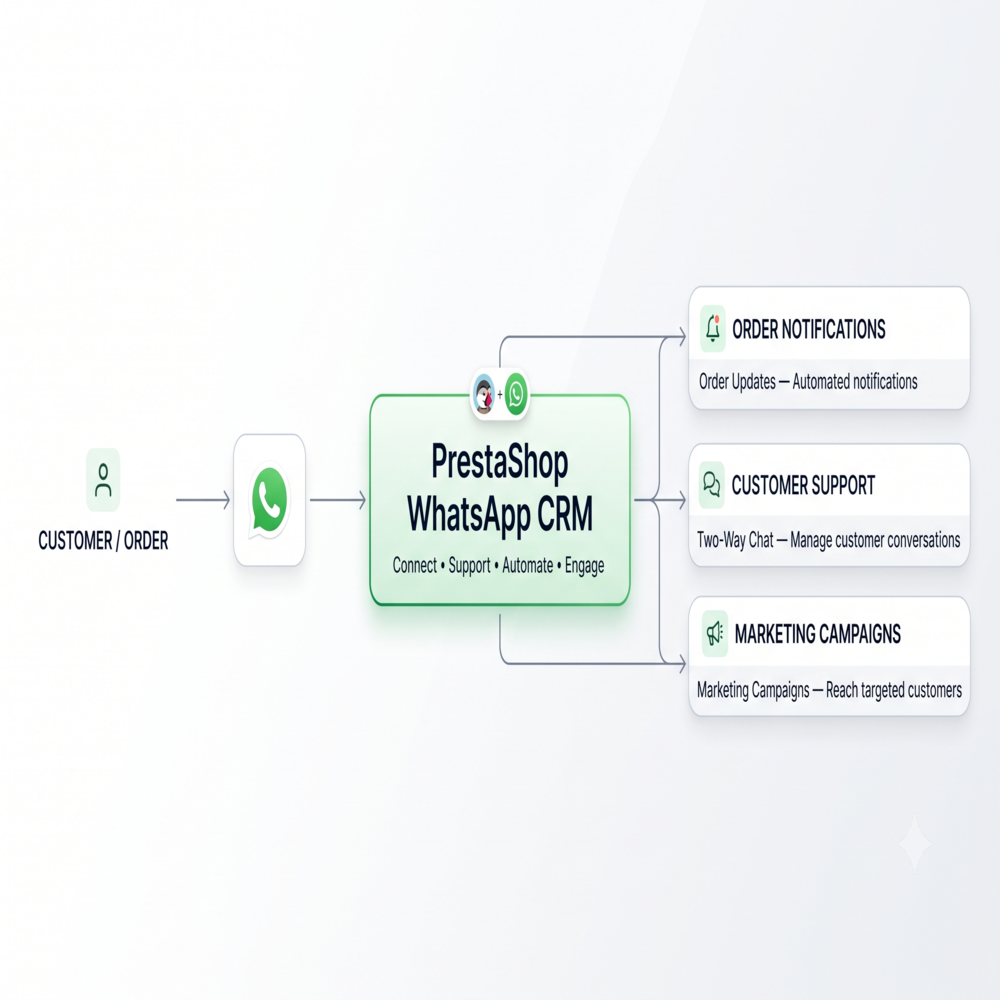
A useful implementation starts with the customer journey rather than the module menu.
1. Order communication
Begin with the messages that customers genuinely need. Enable the new-order notification, then decide which PrestaShop statuses deserve an outbound WhatsApp alert.
The order-status configuration allows each relevant status to have its own approved Utility template. For example, your store can have its own messages for payment confirmation, shipping, delivery, cancellation, and refunds. The list of statuses can be different depending on the statuses that you configure in your store.
This is where WhatsApp order notifications for PrestaShop stores can become particularly useful. Instead of sending the same generic update repeatedly, the store can map a specific template to each status that requires customer communication.
The customer’s WhatsApp number also needs to be available for these notifications. The user guide states that enabling order-status messaging adds a WhatsApp number field to the customer address form.
2. Customer support
The second workflow starts when the customer contacts the store.
The CRM area provides a conversation view where contacts appear alongside their chat history. Agents can open a conversation and reply from the PrestaShop administration panel, keeping automated order notifications and support messages in the same thread.
This is more useful than simply placing a WhatsApp icon on a storefront. A basic icon gives visitors a way to start a conversation, but the operational question comes afterward: who handles it, what was discussed, and what did the customer already receive?
The CRM answers those questions through its conversation view and message records. The module’s product documentation also describes agent assignment and chat handling as part of its support functionality.
There is one key WhatsApp rule to take into account. In case the client starts the chat, the module allows a free-text answer during the 24-hour customer service window. After the closing of this window, the CRM will use the approved template for outgoing communication.
That rule should influence support procedures. Agents shouldn’t assume they can send an unrestricted message whenever they want.
3. Marketing and recovery
Marketing is where segmentation becomes useful.
The module allows administrators to create named WhatsApp Lists and assign contacts to one or more lists. Promotional campaigns can then target a selected list using an approved Marketing template and a scheduled sending time.
In the case of the store, it could create different lists of repeat buyers, a specific product category, etc. The key thing is not to have a list for each possible group just because it exists.
WhatsApp could be used for recovering abandoned carts, although it must be done correctly. Current ecommerce guidance recommends checking whether a customer can receive WhatsApp marketing before sending an abandoned-cart message, testing timing, and avoiding excessive reminders.
The supplied module documentation does not confirm a native automated abandoned-cart trigger. That distinction is worth making clearly. The module provides an opportunity to schedule promotional campaigns. However, there is no information in the documentation that the CRM is able to detect an abandoned cart and send out a recovery message.
In case the store requires native cart event automation, it must be seen as a separate requirement rather than assumed to be part of the CRM.
Setting up the WhatsApp Business API connection
The technical setup starts outside PrestaShop.
There must be an activated WhatsApp Business account, a registered WhatsApp Business number, and a properly set-up Meta Developer App for accessing WhatsApp Business API. The user guide lists these as system requirements.
Inside the module, administrators enter the API credentials and select the registered business phone number. The documentation specifically requires a permanent Facebook Access Token rather than the temporary token shown during initial API setup.
A webhook is also part of the setup. The module provides a Webhook URL and Verify Token that need to be entered in the relevant Meta Developer Console configuration. This allows the integration to receive inbound messages and template approval-status updates.
If the webhook is not working, or an administrator wishes to manually sync the templates, there is the Sync Templates button in the Message Templates tab.
This may help developers remember the difference between the PrestaShop module that is responsible for configuring the store and the Meta developer environment, which stays in API configuration.
Templates are the control layer, not just message copy
Template configuration deserves more attention than it usually receives. A well-configured PrestaShop WhatsApp CRM Module makes the difference between WhatsApp order notifications PrestaShop customers actually find useful and generic messages that get ignored.
The module’s Message Templates section lets administrators create templates, specify their use, choose a category and language, add variables, and submit the template for WhatsApp approval. Knowband has documented this process step by step in the module’s user guide.
For an order confirmation, the template should serve the transactional purpose clearly. Variables can be inserted for information such as the customer name, order ID, and order total, according to the supplied documentation.
A common configuration problem occurs when a template doesn’t appear in the Order Settings dropdown. The documentation identifies two likely causes: the template is still pending approval, or WhatsApp has classified it as Marketing rather than Utility.
The same principle applies to promotional messaging. Marketing templates should be kept for actual marketing communication rather than trying to force promotional language into a transactional template.
According to current WhatsApp marketing best practices, customer consent for messaging should be obtained before launching any marketing messages. Shopify, for instance, suggests that marketing campaigns via WhatsApp should only be sent to customers that have consented to receive such messages.
This means that the issue of consent should be considered during setup and not later.
Give the support team a usable storefront entry point
A CRM can only help if customers know where to start the conversation.
The module provides a storefront chatbox that can display a WhatsApp icon on the website. Administrators can configure its position, size, appearance, animation, and other visual settings.
The WhatsApp Agents section adds another practical layer. Store teams can configure agents with names, departments, contact numbers, avatars, and display order, allowing visitors to select the appropriate person from the chat popup.
For a small store, one agent may be enough. A larger operation might distinguish between sales and support. The configuration should reflect how the team actually works, rather than creating departments simply because the interface allows them.
Managing contacts and campaigns without losing control
The contact database becomes increasingly important once WhatsApp communication grows beyond individual conversations.
Contacts may be entered manually, or imported in CSV format. Contacts may be updated during the import process, while new contacts will be added to the database. Contacts can then be assigned to named WhatsApp Lists.
This also implies a certain responsibility: not every contact from the database can be considered automatically eligible for receiving marketing messages.
Marketing campaigns are scheduled using the Promotions tab. The module’s CRON-based campaign process checks for campaigns that have reached their scheduled time, with the documented CRON command running every minute.
The guide advises testing a small quantity prior to sending a bulk campaign, as WhatsApp Business API messaging entails a cost per message.
This is wise operationally. A test can expose a wrong template, incorrect personalization, bad list selection, or an unexpected message cost before the campaign reaches the full audience.
Use message logs when something goes wrong
Automation makes the conversation fast, but automation also makes troubleshooting necessary.
The module includes logs for the messages coming in and going out of the system, together with information like the phone number, template name, WhatsApp Message ID, status, and timestamp.
What if the customer claims that he or she didn’t get the shipment message? Checking the order alone won’t necessarily tell the support agent what happened. The message log can show whether the message was sent and its recorded delivery status.
For technical teams, logs also provide a useful first checkpoint before changing configuration. If messages are missing, check the relevant template, recipient number, API credentials, webhook configuration, and recorded message status rather than immediately reinstalling the module.
A practical rollout for a PrestaShop store
A phased setup usually makes more sense than enabling everything on the same day. The Knowband PrestaShop WhatsApp CRM Module gives administrators enough control to roll out each layer independently.
Start with order alerts. Configure one new-order Utility template and a small number of important order statuses. Test the complete flow with internal orders before exposing it to customers.
Then open the support channel. Set up the agents and chat box, send a test message from a customer’s account, and see if the conversation ends up in the CRM. Make sure that the agent can reply within a 24-hour customer-initiated time limit.
Next, organize contacts. Import existing contacts only after reviewing your consent and communication practices. Build a few useful lists instead of creating an elaborate segmentation system that becomes difficult to maintain.
Finally, introduce campaigns. Create an approved Marketing template, test it on a small list, schedule the campaign, and verify that the server-side CRON process is running correctly.
This order also makes troubleshooting easier because each layer has been tested before another dependency is introduced.
How the Module Fits Into the WhatsApp Communication Stack
A PrestaShop WhatsApp Integration Module will be the most helpful when there is a need to make WhatsApp into an operational tool for customer communications and not just a button on your website.
PrestaShop 1.7.x, 8.x, and 9.x are supported by the current module, according to the current product documentation.
The greater benefit lies in having all order messaging, support conversations, contacts, campaigns, agents, templates, and logs integrated in one PrestaShop. That doesn’t eliminate the need for Meta configuration or sensible communication policies, but it reduces the number of separate places an ecommerce team has to manage.
For developers, the main considerations are API credentials, webhook configuration, template approval, customer-number availability, and scheduled campaign execution. For store managers, the focus shifts toward template governance, agent responsibilities, consent, list maintenance, and message monitoring.
Conclusion: keep customer communication close to the store
The WhatsApp CRM module for PrestaShop will enable WhatsApp to become more than just a messaging app but an integral part of the business’s customer management process. Orders can be set to notify the user depending on the activities happening within the store, while the customer support team can operate from within PrestaShop.
The strongest implementation is usually the disciplined one. Start with useful transactional alerts, establish a clear support process, maintain clean contact lists, respect WhatsApp’s messaging rules, and test campaigns before scaling them.
The PrestaShop WhatsApp Manager functionality documented for this Knowband module provides the administrative foundation for those workflows, while the actual API connection still depends on the Meta-side WhatsApp Business setup.
If you’re evaluating a PrestaShop WhatsApp Integration Module, you can review the confirmed capabilities and compatibility on the PrestaShop WhatsApp CRM Module Page. This module is also availabe on the prestashop Addons. For implementation details, the PrestaShop WhatsApp Manager documentation provides the configuration steps.

