
If you run a PrestaShop store, you’ve probably seen the php2shell headlines by now. On 21 October 2026 PHP pushed out fixes for two critical flaws, CVE-2026-109618 and CVE-2026-109619. The bugs are in PHP itself. Not in PrestaShop. Not in your modules. So there’s nothing to click in the back office: as PrestaShop’s own announcement says, “there is no PrestaShop patch to install“. The PrestaShop PHP security update happens on the server.
On PrestaShop 9 that’s straightforward. On 1.7 and 8.x it gets messy, and that’s what most of this post is about.
Why a PrestaShop update won’t help
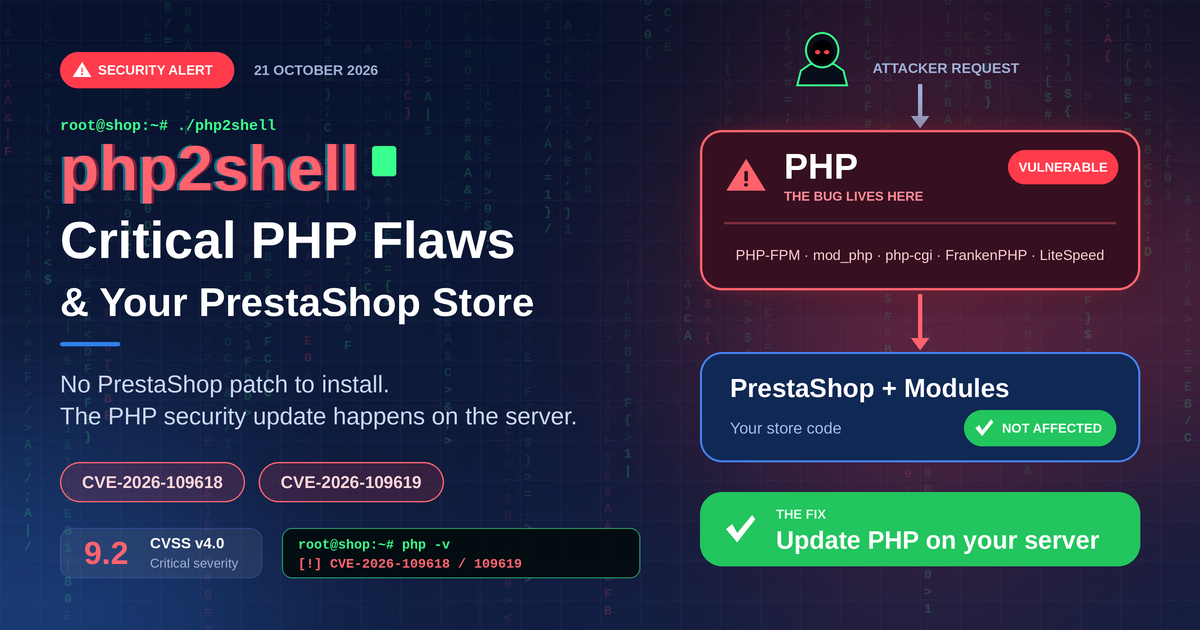
PHP handles every request before PrestaShop sees it, and that’s where both bugs live. From the PHP security advisory:
- CVE-2026-109618: PHP runs out of memory mid-way through a request’s setup. Then cleanup runs, and it trusts data nobody finished writing.
- CVE-2026-109619: a bit of state from one request outlives the memory behind it, and the next request on the same worker can trip over it.
Each one scores 9.2 on CVSS v4.0. Every common way of running PHP is affected: PHP-FPM, Apache with mod_php, php-cgi, FrankenPHP and LiteSpeed. mod_php is the worst. The PHP team has a working exploit there that needs no login and fires before your application code even starts.
ENISA, CERT-EU and other EU bodies put out a joint statement too: patch internet-facing systems first. Your shop is exactly that.
Which PrestaShop PHP version gets an official fix?
Fixed releases came out for four PHP branches, and only those: 8.2.35, 8.3.36, 8.4.27 and 8.5.12. 7.4, 8.0 and 8.1? No release. The PHP security team only published small source patches for those. Distributions and LTS vendors had the patches early, though, so a backported package may already be waiting for you.
Now, let’s see how the PHP versions supported by each PrestaShop release compare with the versions that include the security fixes.
| PrestaShop Version | Compatible PHP Versions | Availability of Security Fixes |
|---|---|---|
| PrestaShop 1.7.8 | PHP 7.1–7.4 | No official fixed release in this range. A security backport may be available for PHP 7.4. |
| PrestaShop 8.0–8.2 | PHP 7.2–8.1 | No official fixed release in this range. Backported fixes may be available for PHP 7.4, 8.0 and 8.1. |
| PrestaShop 9.0 | PHP 8.1–8.4 | Fixed releases: PHP 8.2.35, 8.3.36 and 8.4.27. |
| PrestaShop 9.1 | PHP 8.1–8.5 | Fixed releases are available from PHP 8.2.35 through 8.5.12. |
Sources: PrestaShop system requirements for 1.7, 8 and 9.
What should you take away from this?
If your store runs PrestaShop 1.7 or 8.x, you may need your hosting provider to apply a security backport to your existing PHP version. Don’t upgrade PHP blindly, as a newer version may fall outside your store’s compatibility range. Confirm that the fix is installed and plan your PrestaShop upgrade as a separate project.
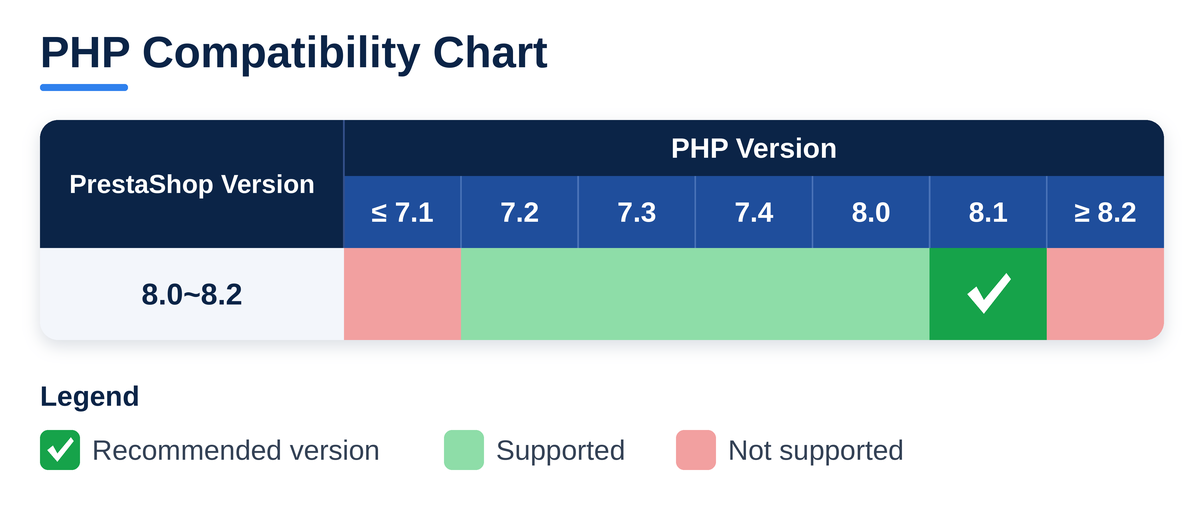
PrestaShop 8.0–8.2 supports PHP up to 8.1. PHP 8.2 and above, the only branches with official php2shell fixes, are marked as not supported. Source: PrestaShop developer docs.
See the problem? No 1.7 or 8.x store can run an officially fixed PHP. If that’s you, you’re relying on a backported build from your host, your Linux distribution or an LTS vendor. On PHP 7.3 or below? Then the advisory has no backport for you. A 1.7.8 store can go up to 7.4. Anything older than 1.7.8 tops out at 7.3, which means upgrading PrestaShop first.
So should you jump to PrestaShop 9 this week? Probably not. PrestaShop’s own line is: patch PHP now, and do the upgrade later as a proper project once your theme and modules are checked. Just don’t let it slide. PHP 8.1 and older are already out of upstream support, and PHP 8.2 follows on 31 December 2026.
How to apply the PHP security update on shared hosting
- Look up your PHP version in the back office under Advanced Parameters > Information.
- Ask the host, in writing, whether both CVEs are patched on your account. PrestaShop recommends written confirmation too. Something like: “Is the PHP on my account patched for CVE-2026-109618 and CVE-2026-109619? Which build, and has PHP been restarted since?”
- On PHP 8.1 or older, ask about the backport by name.
- Resist switching to PHP 8.4 in the hosting panel because it’s “the fixed one”. On an 8.x store that’s outside the supported range, and you’d swap one problem for another.
On your own VPS or dedicated server
PrestaShop 9 stores take the fixed PHP release. For 1.7 and 8.x, install your distribution’s package with the backport. Then restart every PHP process, whether that’s PHP-FPM pools, Apache, LiteSpeed or FrankenPHP. On Docker, rebuild the image on the updated base and redeploy. A patch that’s installed but never loaded doesn’t protect anything.
On Debian or Ubuntu with PHP-FPM, for example:
# take a snapshot or backup first
sudo apt update && sudo apt install –only-upgrade ‘php8.1-*’
sudo systemctl restart php8.1-fpm # match your PHP version; restart apache2 for mod_php
Is the fix really live?
Three things catch people out.
The wrong PHP. php -v over SSH shows the command-line PHP, and your store may be served by a different PHP-FPM version. The Advanced Parameters > Information page shows the one that matters.
The version number. Distros tend to backport fixes and leave the version alone, so “8.1” proves nothing either way. Grep the package changelog for the CVE IDs. Both should show up:
zgrep -ohE “CVE-2026-10961[89]” /usr/share/doc/php8.1-*/changelog.Debian.gz | sort -u # Debian / Ubuntu
rpm -q –changelog php-fpm | grep -oE “CVE-2026-10961[89]” | sort -u # RHEL, AlmaLinux, Rocky
Old workers. Then look at systemctl status php8.1-fpm (apache2 on mod_php setups). Started before the update? It’s still on the old code.
Stop-gaps while you wait
The PHP advisory is clear that only an update fully fixes this. Waiting on a host or vendor? In the meantime, a few settings block some of the known attack paths. Put them in php.ini or the FPM pool and restart the workers. ini_set() and .user.ini don’t count here:
session.upload_progress.enabled = 0
post_max_size = 32M
fatal_error_backtraces = 0 ; PHP 8.5 only
; same settings in an FPM pool file
php_admin_flag[session.upload_progress.enabled] = off
php_admin_value[post_max_size] = 32M
PHP suggests 8M for sites where nobody uploads anything. A PrestaShop back office isn’t one of them. PrestaShop lists what low limits break: product images, catalog imports, module and theme installs, and any module that accepts uploads. So stay at 32M, keep upload_max_filesize below it, and try an image upload and an import on staging first.
memory_limit=-1 is on PHP’s list as well, but only use it when a container or cgroup caps PHP’s memory from outside. Without that, one heavy import can take the whole server down. And don’t use RLIMIT_AS or RLIMIT_DATA as that cap.
On Cloudflare? Its php2shell WAF rules have been active by default since 21 October, free plans included. Paid plans should check the managed ruleset is in block mode, and your server should only accept traffic that comes through Cloudflare. Useful, but it isn’t the fix.
If none of this is possible, the EU joint statement suggests taking exposed applications off public networks until they’re patched.
Quick checklist
- PHP version taken from the back office, not from php -v
- Fix confirmed by the package changelog or in writing by the host
- PHP-FPM or Apache restarted, Docker images rebuilt
- PHP still inside your PrestaShop version’s supported range
- Stop-gaps tested on staging and removed after patching
- PrestaShop 9 upgrade on the calendar for 1.7 and 8.x stores
Need Help Securing or Upgrading Your PrestaShop Store?
The first step is to confirm whether your PHP environment has been patched for CVE-2026-109618 and CVE-2026-109619. If you’re running PrestaShop 1.7 or 8.x, you may also need to consider PHP version compatibility, available security backports, and your long-term upgrade options.
Knowband can help you assess your store’s requirements and plan the next steps. Our team can assist with PHP security patch verification, module and theme compatibility checks, and planning your migration to PrestaShop 9.
If you need help securing your existing store or preparing for an upgrade, contact us at [email protected] or reach out through our official WhatsApp support channel.
Secure your current store first. Plan your upgrade with confidence.
References
For the latest security guidance, PHP patch information, and PrestaShop compatibility requirements, consult these resources:
- PHP Security Advisory (21 October 2026): PHP security updates
- PrestaShop Security Guidance: Critical PHP security updates — what PrestaShop users need to know
- ENISA, CERT-EU and partners: Joint statement on critical PHP vulnerabilities
- PrestaShop 9: System requirements
- PrestaShop 8: System requirements
- PrestaShop 1.7: System requirements
- Knowband Security Advisory: Critical PHP Vulnerabilities: Updates and Security Guidance for 2026


: What PrestaShop Merchants Need to Do)